







Calico, the leading solution for container networking and security, unveils a host of new features this spring. From new security capabilities that simplify operations, enhanced visualization for faster troubleshooting, and major enhancements to its popular workload-centric distributed WAF, Calico is set to redefine how you manage and secure your containerized workloads.
This blog describes the new capabilities in Calico.
Simplified security operations for Runtime Threat Detection
Runtime threat detection generates a large number of security events. However, managing and analyzing these events can be challenging, and users need a way to summarize and navigate through them to gain deeper insights and take appropriate actions. Let’s see how Calico simplifies runtime security operations.
New Security Events Dashboard
We are excited to announce the introduction of the Security Event Dashboard in Calico. This dashboard provides a summary of the security events generated by the runtime threat detection engine. With the Security Event Dashboard, users can easily analyze and pivot around the data, enabling them to:
- Efficiently find and analyze specific segments of security events.
- Collaborate with stakeholders involved in the analysis, response, and remediation of security events.
The Security Event Dashboard offers a visually appealing and user-friendly interface, presenting key summarizations of security events happening within the cluster. Users can click through to access filtered lists of events for further investigation.
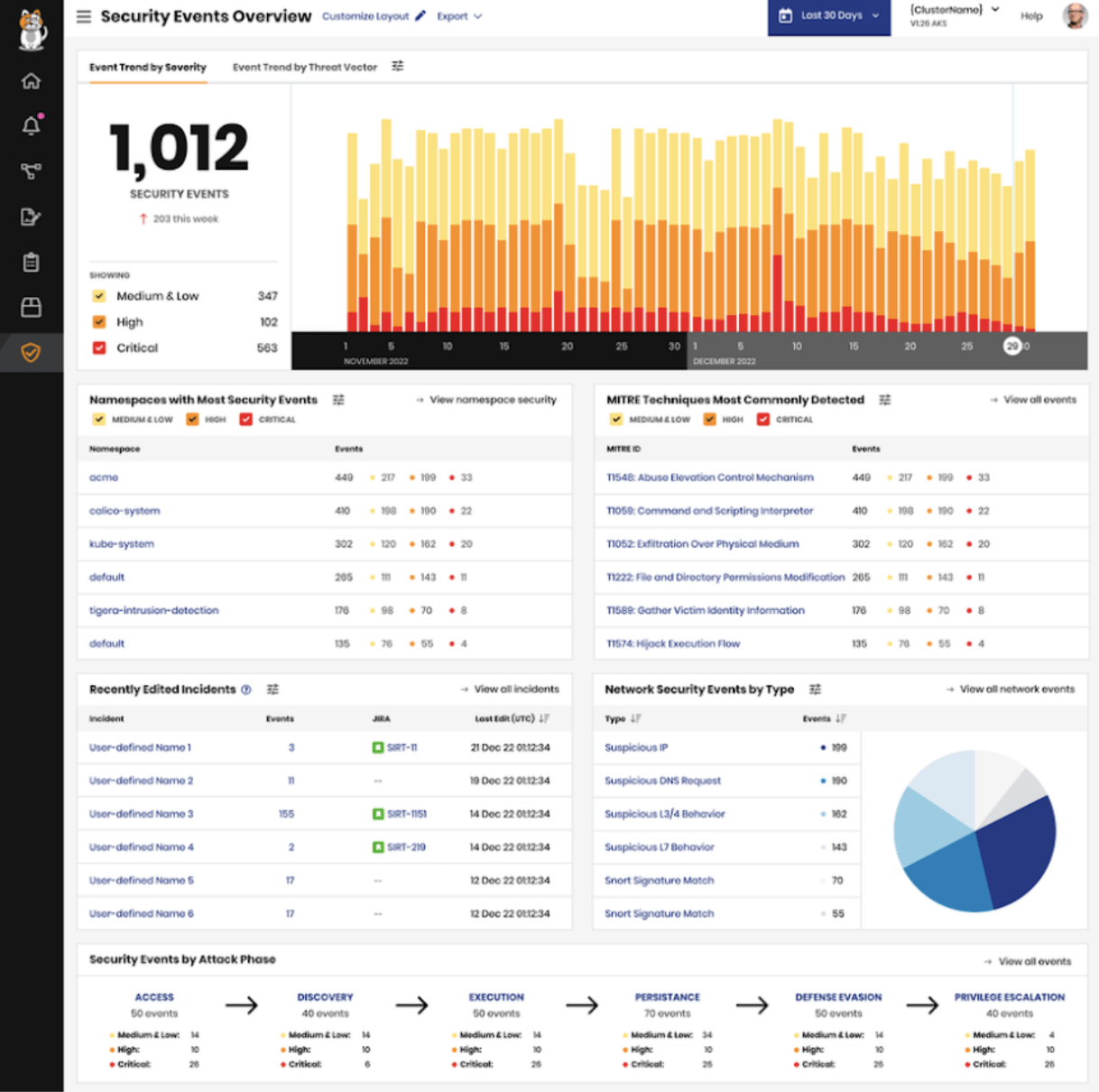
With the Security Event Dashboard, administrators can now gain valuable insights into their security events, streamline their analysis, and enhance their incident response capabilities. This powerful tool empowers organizations to proactively address potential threats and ensure the security of their containerized environments.
Webhooks integration for instant notifications
Calico now supports custom webhooks for security events, enabling seamless integration with third-party tools like Jira and Slack, as well as other HTTP endpoints of your choice. What’s more, we have added support for custom headers, providing even greater flexibility and customization options for external integrations. Now, you can effortlessly connect Calico with your preferred tools and systems, enhancing your incident response capabilities and streamlining your security operations.
IP ASN & Geolocation context
It is crucial to have access to relevant information about suspicious IPs when reviewing alerts. To address this requirement, we have enhanced our security events to include IP geolocation and ASN (Autonomous System Number) metadata.
Imagine you are flooded with a bunch of IP addresses (say in the 175.45.x.x subnet) in your security events and you need more context as to why this is happening. With the new geolocation and ASN context, you can confirm that these are rogue nation states trying to infiltrate your Kubernetes cluster. Security events that involve an IP address, such as IDS, WAF, and DPI, now include additional metadata consisting of the country associated with the IP address and the ASN name. This context enables analysts to quickly assess the severity of the event and prioritize their response accordingly.
Accelerated troubleshooting: Enhanced traffic visualization
Troubleshooting service outages in Kubernetes can be a time sink. Traffic flow logs deliver context-rich information to end users to understand and troubleshoot network traffic in Kubernetes. Quickly identifying the source of denied traffic, including the associated workloads and policies, remains a challenge. To address this, Calico enables users to view flow logs directly within Calico, eliminating the need for other tools.
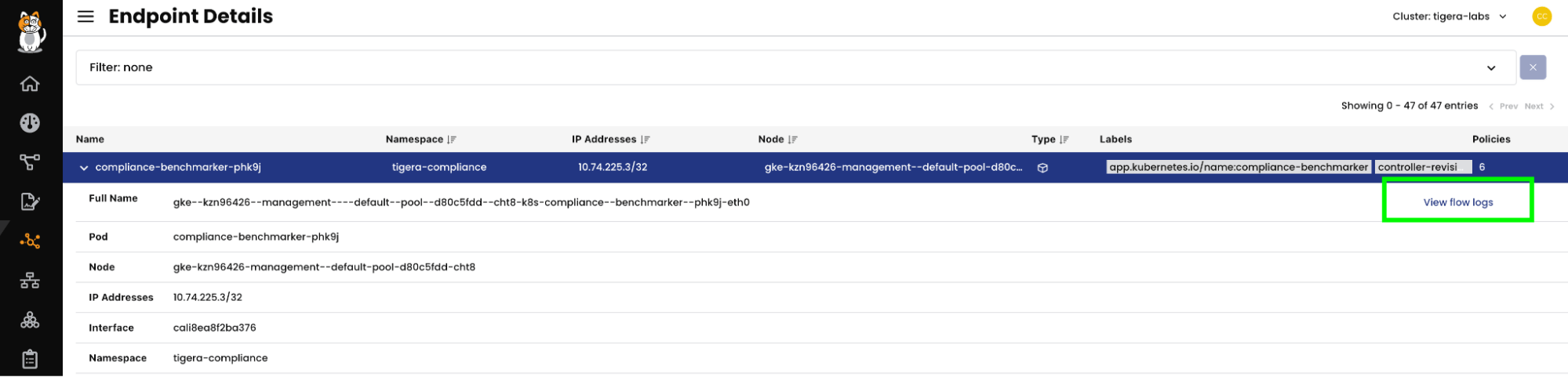
The first option is available on the ‘Endpoints’ page. By selecting and expanding the row for a specific endpoint, users can click on a “View flow logs” link. This action opens a flow log panel that displays the filtered logs associated with that workload. To further refine the view, the user can apply a filter at the top of the page, displaying only the pods/deployments associated with denied traffic.
The second option is accessible from the View Policy page. Upon selecting a policy, the View Policy page now includes a “View flow logs” link. Clicking on this link opens a flow log panel that contains the filtered logs associated with that policy. Users can view the denied flow logs for a specific policy and analyze the source, destination, ports, protocols, and other key metadata associated with those flows.
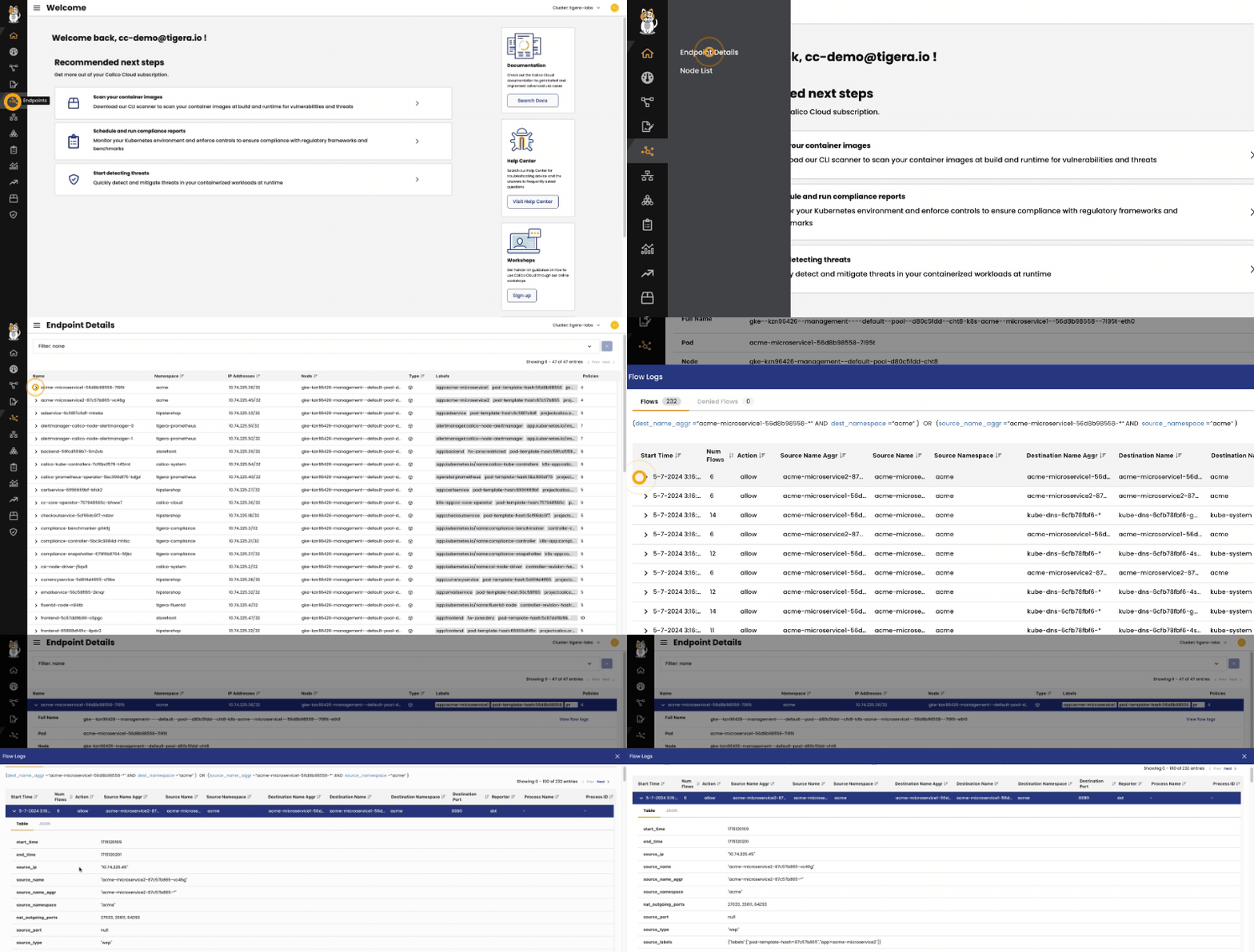
These new additions for viewing flow logs significantly enhance the observability and security capabilities of Calico Enterprise and Calico Cloud. Users can now quickly access flow log data related to denied traffic, streamlining troubleshooting and security analysis processes.
Extend workload-centric WAF to ingress gateway
As the adoption of microservices-based architecture continues to grow among cloud-native applications, the number of services exposing application-layer APIs has seen an exponential increase. To add to the existing attack surface, the rise of AI and ML applications has rapidly expanded the threat vector. In fact, MITRE and OWASP have already published detailed reports on AI and LLM (Large Language Models) security and application-layer attacks such as prompt injection and training data poisoning. In this distributed application landscape, it becomes crucial to detect and prevent lateral movement of threats at the application layer. Traditional web application firewalls (WAFs) fail to address this scenario, which is why Calico developed a distributed workload-centric WAF specifically designed to safeguard service-to-service communication within Kubernetes clusters.
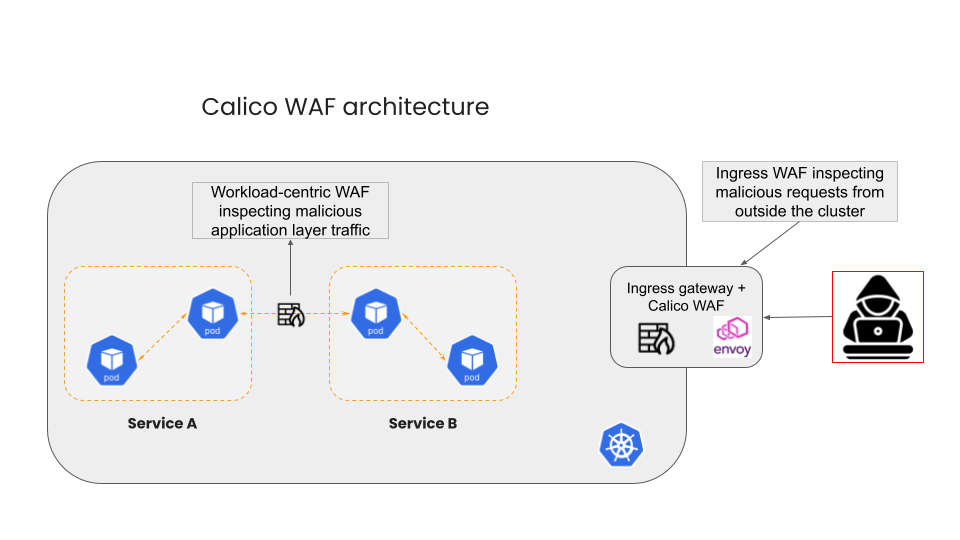
Calico’s distributed WAF operates directly inside the Kubernetes cluster, providing granular protection and visibility at the workload level. However, with the latest release, Calico goes beyond that by offering an extension of the WAF, which can be integrated with the ingress gateway at the edge of the cluster.
By extending the WAF to the ingress gateway, Calico enables operators to protect the entire cluster from OWASP Top 10 attacks (such as XSS and SQL injection), covering a wide range of common vulnerabilities and ensuring comprehensive security coverage. The WAF provides granular control over incoming traffic by inspecting HTTP requests, allowing you to block or allow specific requests based on predefined rules and conditions.
By leveraging Calico’s comprehensive WAF solution, businesses can ensure the integrity and availability of their applications, safeguard sensitive data, and maintain compliance with industry regulations. This enhancement solidifies Calico’s position as the industry leader in providing the most complete WAF solution for containers and Kubernetes environments.
Support for ARM64
We are thrilled to share the exciting news that, in direct response to the growing demand from our customers, we are introducing ARM64 support for Calico Enterprise. By incorporating ARM64 support into our products, we are ensuring that our customers can leverage the low-cost, high-performance benefits of this architecture.
Exclude Namespaces and services from image scanning
Vulnerability scanning can result in a large volume of results across all of the applications and supporting components running in a cluster. Calico Cloud now provides the ability to exclude, or allowlist, namespaces and services from in-cluster scanning and the runtime view. This enables teams to phase their vulnerability response and focus their remediation efforts on business-critical applications or those components with a greater level of network exposure.
Create and manage API tokens
We are implementing changes that will empower users to create, revoke, and manage their own API tokens, providing greater control and flexibility. Platform administrators will be able to automate the addition of new clusters to Calico Cloud, ensuring consistent default security settings and seamless integration with their Infrastructure-as-Code (IaC) tools. This enhancement not only enhances security but also streamlines operations for administrators, enabling them to efficiently manage their infrastructure.
Summary
In closing, this release introduces a suite of new features designed to enhance the visibility and security of containerized workloads in Kubernetes. These new features collectively strengthen Calico’s position as the industry’s only container security platform with built-in network security. By leveraging these capabilities, organizations can gain deeper insights into their network traffic, implement robust security measures, and safeguard their applications from potential threats. With Calico, businesses can confidently deploy and manage their Kubernetes workloads, ensuring optimal performance and security.
Go to our docs section to learn more about the announcements: