










Kubernetes is used everywhere, from test environments to the most critical production foundations that we use daily, making it undoubtedly a de facto in cloud computing. While this is great news for everyone who works with, administers, and expands Kubernetes, the downside is that it makes Kubernetes a favorable target for malicious actors.
Malicious actors typically exploit flaws in the system to gain access to a portion of the environment. They then chain these flaws together to move laterally within the environment, ultimately seeking root access or access to critical information.
While the best way to fix security flaws in any software is to patch it with appropriate fixes that the project maintainers publish, there are certain security practices that you can adopt to fortify your environment, like using network policies. However, most people find network policies complex and overwhelming, which discourages them from implementing policies in their environment.
In this blog post, we will examine four pain points that people face when they want to implement network policies and provide solutions to help you effectively secure your Kubernetes environment.
What is a network policy and why should I use it?
In Kubernetes, a network policy (KNP) resource is the main way to secure a cluster. A policy is a descriptive way to express one or multiple network flows to be matched via its attributes such as namespace, labels, direction, etc., to a verdict. Keep in mind that Kubernetes does not enforce a policy and delegates the enforcement to CNIs. In addition, the default network behavior of Kubernetes is to permit all networking flows in the absence of policies.
Implementing network policies is a great way to secure your cluster. By limiting your resource/workload exposure and only allowing traffic that is intended to flow, you can significantly minimize your attack surface. In fact, in our previous blogs, we have used simple policies to showcase how these resources can secure your cluster for zero-day attacks such as log4j and xz vulnerability.
Setting up and managing network policies is too complex and overwhelming
The main issue that users usually face when trying to adapt network policies is that these resources can get very complex and often overwhelm ordinary and veteran users. While this is a valid observation, it can be rooted in the way that KNP resources are designed. KNPs don’t offer order numbers, making it very difficult to manage these resources. On top of that, since KNPs don’t have an explicit action, it could take a lot of time to figure out how a policy is actually behaving without digging through iptables rules or eBPF policy programs.
Calico Open Source extends the original policy model and adds features like order precedence, explicit action, and logging. Combining these three features allows you to design and troubleshoot your policies in any environment. If you’d like to learn more, check out our previous stream that uses all these features to create a secure cluster.
Note: We have devoted considerable time and resources to addressing this concern as part of our ongoing educational effort. In fact, you can find multiple pieces of content around Calico Open Source policy design in our docs and a full-blown guide on how to design your policies with a real-life example in GitHub.
Policy design should not be time-consuming
Another pain point users often face with policies is the complexity of designing these resources for an environment. However, policy design complexity usually tends to be caused by us not fully utilizing the features that our CNI offers.
For example, to design a policy, we usually tend to start guessing a workload’s/resource behavior and then sketch an initial policy file, then modify that initial rule/s until we accomplish our agenda. While this is a valid approach, it’s not the most efficient way to approach this task, hence painting policy design as a time-consuming task.
To remedy that, Calico Open Source users who are using the iptables data plane can set a Log action that emits all the traffic in the form of a “syslog” and then use that information to create a policy regarding that information quickly.
Calico Enterprise and Calico Cloud take this approach to another level by providing a full-blown observability tool kit with complete flow logs (L3, L4, L7, and per application process) and a visual interface (usually regarded as a service graph) that allows you to interact with all the flows simply.
With Calico Cloud and Calico Enterprise, you can also utilize the power of the policy recommendation engine to automatically create policies based on the flows that have happened in your environment.
How does policy recommendation help?
The Calico policy recommendation engine creates policies by locally observing your cluster networking traffic to create a baseline for your workloads’ traffic behavior.
Note: Staged policies are unique Calico resources that can show you policy behavior without enforcing any changes to the traffic.
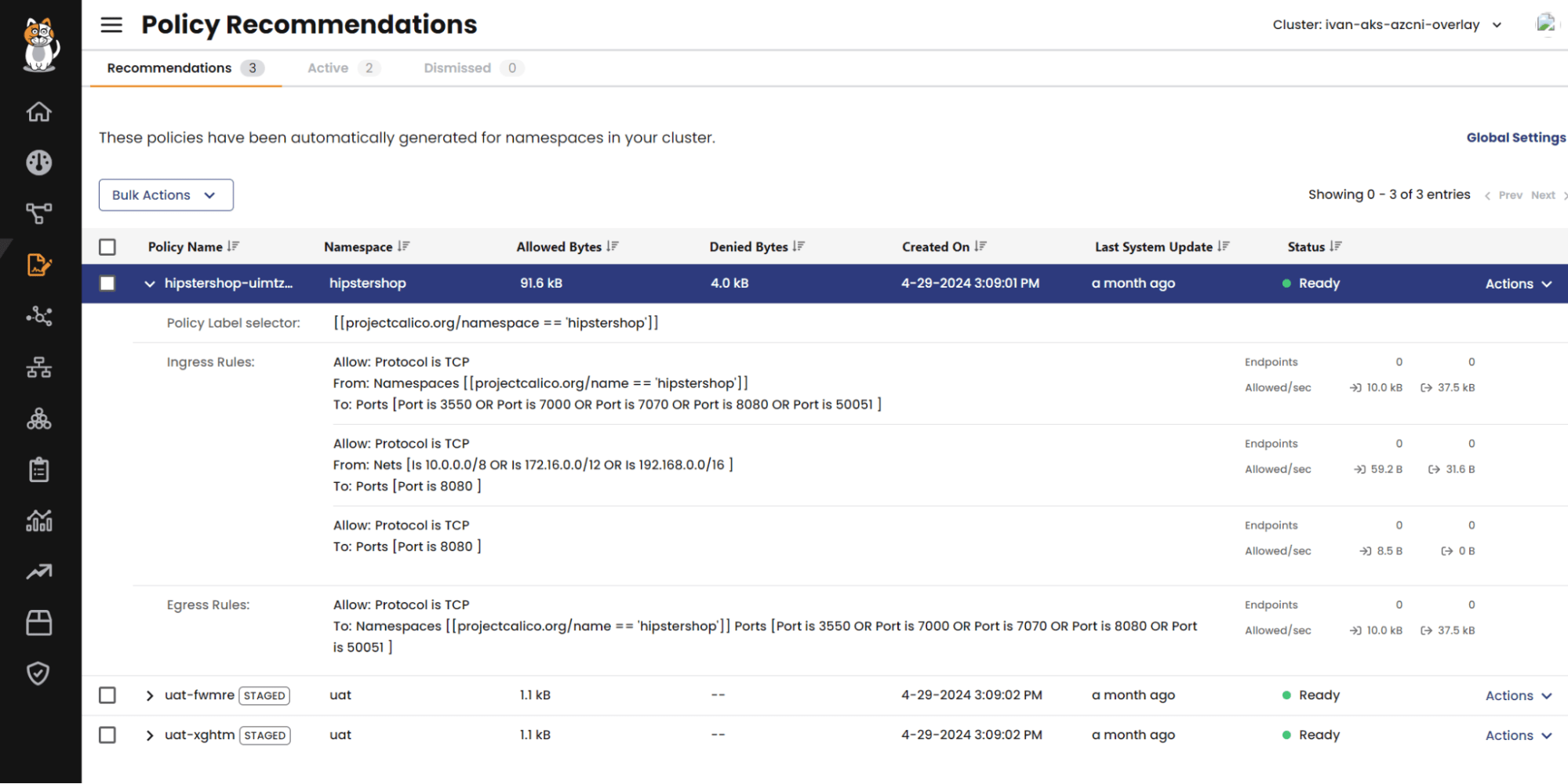
Recommendation engine suggestions are listed on the board in the form of staged policies, which means they are not enforced but you can see their effect/behavior in real time.
Inside the recommendation board, you can easily check the policy details and the amount of traffic they affect to understand the policy’s behavior better. If a policy is something that you’d like to have, you can enforce it by implementing it with policy actions.
But policies have a huge overhead!
Another point that usually discourages people from implementing network policies is the performance overhead that these resources might cause in an environment.
Given that Kubernetes networking and network security are normally handled by software-defined networking, applications, resources, and objects that implement these features impact cluster performance by taking CPU cycles from cluster nodes that could go toward your services and applications. In general, each network policy that you create will have an initial cost for your CNI/policy engine to be evaluated and sorted before it is injected into the Kernel to take effect.
Calico has an efficient policy engine that can program policies for many dataplanes (e.g., iptables, eBPF, VPP, Windows HNS), and we are continuously improving Felix (Calico’s brain) to make it even faster. Our current benchmark has shown that we can easily program network policies at scale on more than 15,000 nodes and program 10,000 policies on every running pod.
To learn more about scale testing and our benchmarking process, watch this CalicoCon session about network policy at scale