










The Next Step Toward a Unified Kubernetes Platform: Istio Ambient Mode
Organizations are struggling with rising operational complexity, fragmented tools, and inconsistent security enforcement as Kubernetes becomes the foundation for modern application platforms. As a result of this complexity and fragmentation, platform teams are increasingly burdened by the need to stitch together separate solutions for networking, network security, and observability. This fragmentation also creates higher operating costs, security gaps, inefficient troubleshooting, and an elevated risk of outages in mission-critical environments. The challenge is even greater for companies running multiple Kubernetes distributions, as relying on each platform’s unique and often incompatible networking stack can lead to significant vendor lock-in and operational overhead.
The Tigera Unified Strategy: Addressing Fragmentation
Tigera’s unified platform strategy is designed to address these challenges by providing a single solution that brings together all the essential Kubernetes networking and security capabilities enterprises need, that includes Istio Ambient Mode, delivered consistently across every Kubernetes distribution.
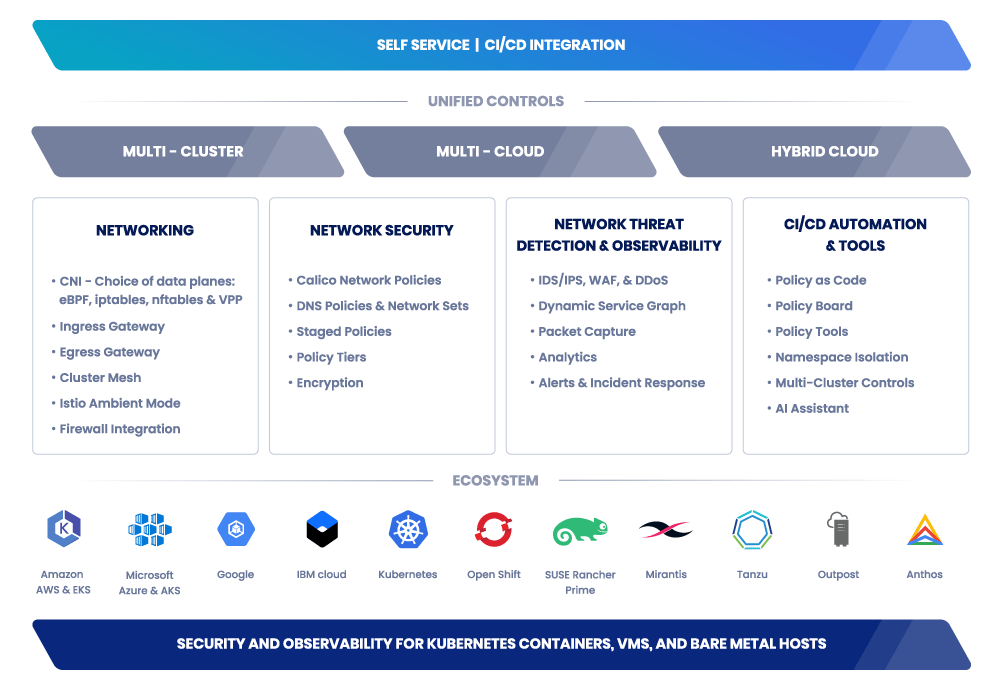
Istio Ambient Mode brings sidecarless service-mesh functionality that includes authentication, authorization, encryption, L4/L7 traffic controls, and deep application-level (L7) observability directly into the unified Calico platform. By including Istio Ambient Mode with Calico and making it easy to install and manage with the Tigera Operator and including enterprise support, Tigera is giving customers a simpler, more scalable, and more secure way to achieve secure networking across their Kubernetes environments. The result is reduced operational strain, lower costs, and a single consistent platform for networking, network security, and observability across every cluster.
To help platform teams understand the full potential of this sidecarless architecture, we will deep dive into the following key capabilities and differentiators:
In this technical deep dive, explore:
What is a Service Mesh
A service mesh is an infrastructure layer that transparently handles communication between the many services in distributed applications, without requiring changes to each service’s code.
Specifically, a service mesh provides:
- Traffic control: routing, load balancing, retries, fail-overs, traffic shifting (e.g. canary deployments), fault injection, and more.
- Security: Authentication, encryption and authorization for service-to-service communication
- Observability: telemetry, distributed tracing, metrics, and traffic logging.
A service mesh decouples network-related complexity (connectivity, security, traffic rules, monitoring) from application logic, letting engineering teams build, scale, and manage application services more reliably and securely.
What is Istio Ambient Mode?
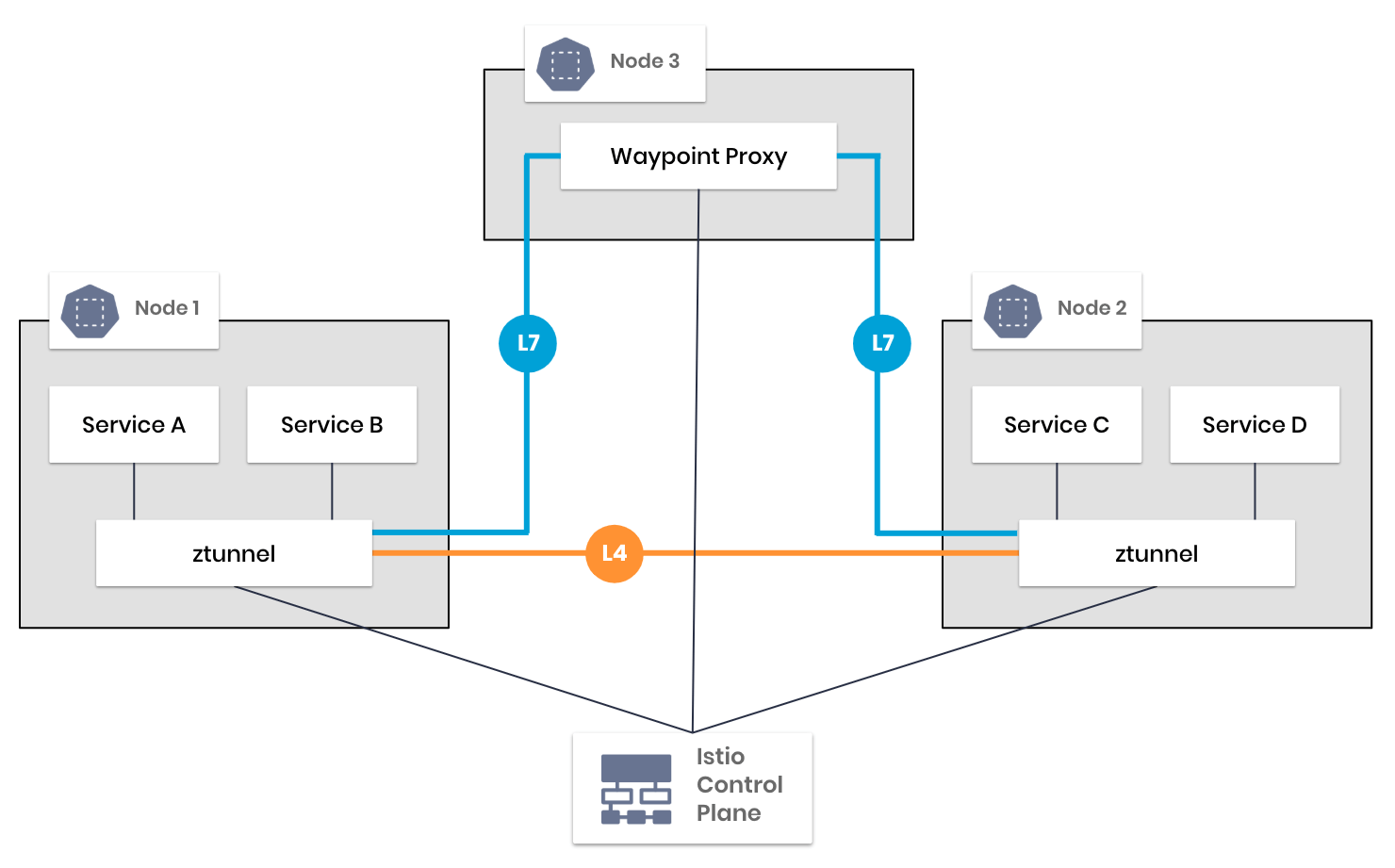
At its core, Istio Ambient Mode is a lightweight, sidecarless service mesh. It is built on two shared data-plane components:
- zTunnel proxy (L4): a node (L4) level zero-trust tunnel that handles identity, authentication, and mutual TLS (mTLS) encryption for all service-to-service traffic. Instead of running a proxy inside every pod, each Kubernetes node runs one zTunnel instance.
- Waypoint Proxy (L7): an optional, namespace-scoped L7 proxy that provides fine-grained traffic routing, retries, shaping, failover, and L7-level authorization.
Together, these components deliver mTLS (encryption and authentication), workload identity, L4/L7 traffic control, and deep observability, while removing the operational burden of per pod sidecars.
Why Istio Ambient Mode? Solving the Sidecar Problem
Traditional Istio service mesh relies on a sidecar proxy for every pod, an approach that adds significant compute cost, complicates development and build pipelines, and creates an ongoing operational burden as clusters scale. Istio Ambient Mode solves this by eliminating sidecars altogether and replacing them with lightweight per-node (zTunnel) and per-namespace (Waypoint) proxies.
💥Complexity: The #1 Service Mesh Adoption BlockerMany organizations evaluating a service mesh quickly find the operational complexity too high:
Istio Ambient Mode with Calico solves this by eliminating thousands of sidecars and simplifying the management experience. |
Istio Ambient Mode in Detail
This section explains how Ambient Mode works under the hood and outlines how it works with Calico.
mTLS Everywhere by Default
One of the most powerful capabilities of Istio Ambient Mode for Calico is how it delivers mutual TLS (mTLS), which includes two-way authentication and encryption across every service communication, without requiring changes to your application code. Let’s walk through exactly how this works, why it matters, and how the bundling of Istio Ambient Mode with Calico preserves both security and policy compatibility.
Why mTLS matters
In Kubernetes, large volumes of traffic move between pods, nodes, clusters, and it is unencrypted by default. This leaves environments vulnerable to threats like man-in-the-middle attacks, spoofing, and eavesdropping. Istio Ambient Mode addresses these risks by providing strong two-way authentication and service-to-service encryption through mTLS, while authorization is enforced using Istio’s network policies.
By using mTLS, both sides of a connection authenticate each other (hence “mutual”), and then they encrypt traffic so that confidentiality and integrity are guaranteed.
How mTLS works in an ambient mode mesh
When a workload (a pod, node, or service) in Istio’s Ambient Mode mesh makes a request, the following happens:
- Certificate provisioning: Each workload (zTunnel proxy) has a certificate (X.509) issued by a trusted Certificate Authority (CA). In an Istio’s ambient mode mesh, the control-plane issues and rotates these certificates automatically.
- mTLS handshake begins: The client initiates a TLS handshake with the server.
- Cryptographic negotiation: Cryptographic parameters (cipher suites, keys) are negotiated.
- Server authentication: The server presents its certificate, and the client verifies it.
- Client authentication (mTLS): In mTLS mode, the client additionally presents its certificate, which the server verifies.
- Session establishment: Once both are verified, they derive a shared session key
- Secure communication: Traffic between workloads proceeds encrypted and authenticated end-to-end.
After the handshake, all subsequent traffic between client and server is encrypted and cannot be meaningfully intercepted or tampered with. The identities of both ends are cryptographically bound to their certificates, not just IP addresses.
This also means that identity does not depend on transient IPs or network location. If a pod moves, re-scales, or changes to a different node, the certificate persists as the identity.
How Calico + Istio Ambient Mode Leverage mTLS
With the bundling of Istio Ambient Mode into the Calico platform:
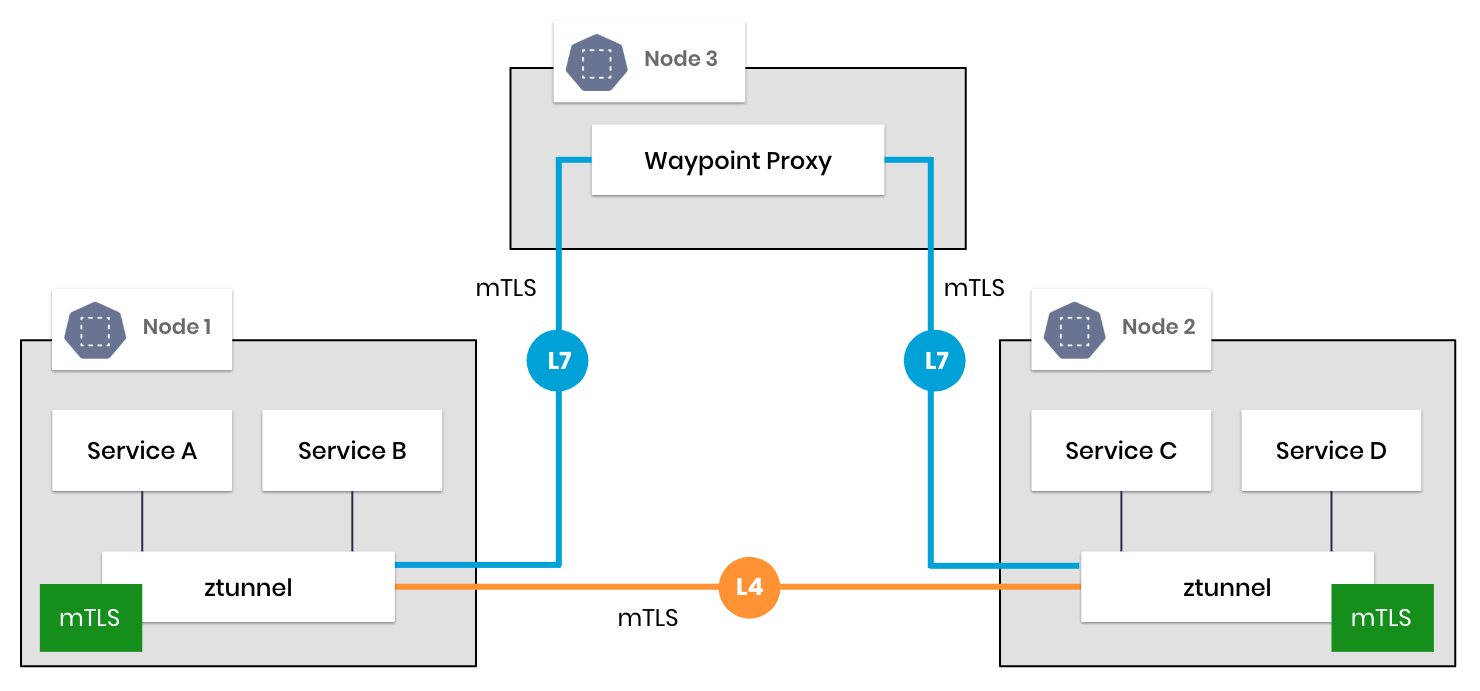
Every Node Runs the Enhanced L4 zTunnel
Every node (that is part of the mesh) runs a lightweight zTunnel (Layer-4) that handles encryption, identity, two-way authentication, and policy enforcement. This per-node deployment drastically reduces overhead compared to traditional sidecars.
Automatic mTLS Encryption and Authentication for All Traffic
When a workload (pod, node, or service) sends traffic, the zTunnel proxy intercepts it, attaches the certificate identity, negotiates an mTLS session (if required), and then forwards the encrypted traffic, whether it’s intra-node, inter-node or cross-cluster traffic.
Preserving Policy Compatibility
Because Calico’s enhanced zTunnel knows the original destination port (instead of forcing everything through, e.g., port 15008), existing Calico/Kubernetes network policies continue to function unmodified. No need to rewrite/tweak any Calico policies to work with the ambient mode mesh.
As a result, you get end-to-end mTLS across all service-to-service communication (even intra-node traffic), without needing to re-architect any of your existing Calico or Istio Ambient Mode policies.
Seamless use of Istio and Calico Policies Together
One of the biggest challenges with Istio Ambient Mode is that all traffic is routed through a tunnel on port 15008, which causes upstream Kubernetes and Calico network policies to lose visibility of the original destination port. Without modifications, security teams would be forced to rewrite their Kubernetes and Calico policies and introduce complex exceptions to get them to work correctly.
Calico solves this with a modified zTunnel proxy that preserves (remembers) the original destination port, allowing existing L3/L4 Kubernetes and Calico network policies to continue functioning exactly as they do today, with absolutely no rewrites needed.
This means:
- No need to explicitly allow port 15008 in any network policies
- No loss of enforcement accuracy
- No change to existing policy definitions
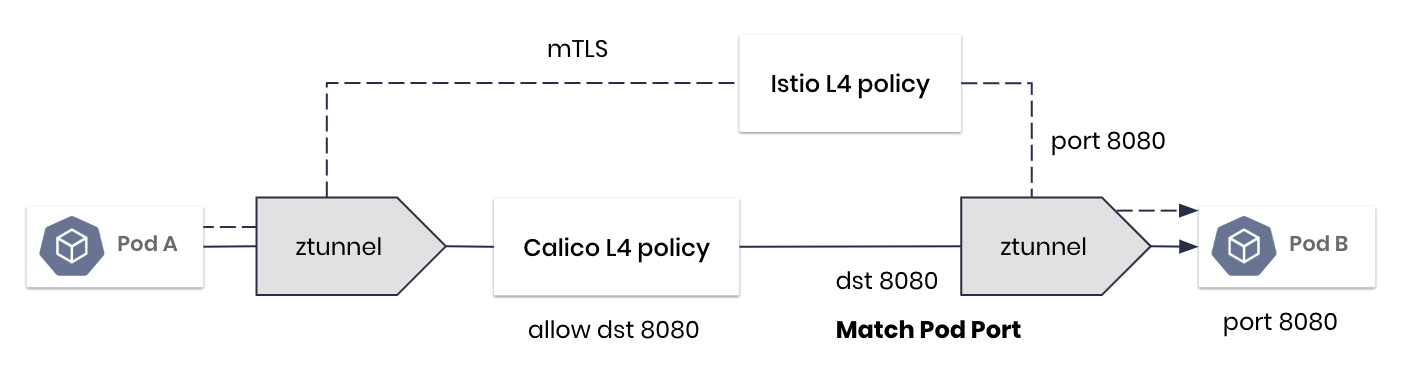
This “best of both worlds” approach enables organizations to adopt an ambient mode service mesh without rewriting network policies or maintaining separate models for Kubernetes networking and ambient mode mesh networking.
Traffic Control Using Istio Ambient Mode
The next layer of power in the Ambient Mode architecture lies in its ability to bring sophisticated, mature Application-Layer (L7) traffic control to Kubernetes workloads, all while bypassing the operational burden of sidecars. Platform teams gain the tools needed to define high-level rules to govern traffic flow, ensure application stability, manage deployments safely, and enforce advanced security policies. To deliver this L7 capability with minimal overhead, Ambient Mode introduces a distinct data plane component: the Waypoint Proxy.
Istio’s Waypoint Proxy: Enabling L7 Control
While the L4 zTunnel handles base security (mTLS) and ensures policy compatibility with Calico, the next layer of power in the Ambient Mode architecture lies in its ability to bring sophisticated application-layer (L7) traffic control to Kubernetes workloads, without relying on sidecars or invasive application changes.
At the heart of Ambient Mode’s L7 traffic control features is the waypoint proxy, a shared L7 data-plane component that operates at the namespace level (usually one waypoint proxy per namespace) instead of running one proxy per pod. When a namespace is configured for Istio Ambient Mode and L7 capabilities are enabled for the namespace, traffic destined for workloads in that namespace flows through the waypoint. This is where Istio applies its powerful suite of L7 traffic control logic, much like a gateway, but tailored specifically for inter-service communication inside the mesh.
Routing and Traffic Shaping
Ambient Mode supports all the signature routing features that make Istio popular in production environments. With the waypoint in place, teams can define VirtualService and DestinationRule configurations that control how traffic moves between services. These rules allow the mesh to do things like:
- Shift traffic gradually between service versions for canary rollouts
- Perform A/B testing by directing certain users or request headers to specific service versions
- Implement blue/green deployments with precise control over cutover timing
- Split or mirror traffic to validate new services before sending production load
The waypoint evaluates routing rules based on attributes like paths, methods, headers, metadata, or user identity, giving teams application-aware control without needing to touch application code.
Resilience and Reliability Features
Traffic control in Ambient Mode also includes Istio’s resilience tools, which help stabilize Kubernetes environments and reduce the impact of failures. Through familiar Istio policy objects, teams can configure:
- Retries for transient errors
- Timeouts to prevent slow downstream services from cascading into failures
- Circuit breakers that protect services from overload
- Outlier detection to automatically eject unhealthy endpoints
- Load balancing strategies that can shift traffic based on latency, least connections, or random selection
These policies make applications far more reliable, particularly during peak traffic, deployments, or partial outages.
Safe Production Deployment Controls
Because L7 traffic always passes through the waypoint proxy before reaching workloads, teams can gather detailed telemetry and test routing changes before committing to them. For example, the mesh can:
- Shadow traffic to a new service version for validation
- Send only a slice of traffic to a new release and automatically roll back based on error rates
- Gradually increase traffic to a new release using percentage-based routing
This allows platform teams and SREs to roll out changes with confidence, leveraging real user behavior under production load while minimizing risk.
Identity-Aware Authorization
Traffic control in Ambient Mode isn’t limited to routing and resilience capabilities, it also helps with identity and authorization. Because the waypoint has access to the workload’s identity (via certificates from zTunnel) and L7 request data, it can enforce AuthorizationPolicy rules. This means you can allow or deny traffic based on:
- Workload identity
- Request paths or methods
- User or service identity
- JWT (JSON Web tokens) or authenticated session metadata
- Custom attributes or request headers
This adds powerful authorization capabilities at the application (L7) layer: beyond authenticating workloads with mTLS, Istio lets you authorize requests based on detailed criteria such as request paths, HTTP methods, workload identity, HTTP and application headers, and more.
In summary, traffic control in Istio Ambient Mode gives teams all the power of Istio’s mature L7 traffic control capabilities: routing, resilience, authorization, and traffic shaping, without the complexity of sidecar proxies.
Application (L7) Observability
One of the advantages of using Istio Ambient Mode is how dramatically it improves observability into application-level (L7) behavior. Calico already provides excellent visibility into L3/L4 network flows. It is sometimes hard to understand why services behave the way they do at the application layer: which requests are failing, which routes are being taken, how retries are affecting latency, etc.
Ambient Mode changes this dramatically by introducing a waypoint proxy for L7 traffic that can capture, enrich, and export L7 telemetry consistently across the ambient mode mesh. These waypoint proxies generate OpenTelemetry-based L7 metrics, traces, and logs. Istio uses OpenTelemetry as its standard observability framework, meaning structured telemetry can show everything from request paths to response codes to end-to-end latency.
With Istio’s application (L7) observability features you can determine:
- Identity-Based Service Communication: See which services are communicating, based on workload identity and request path rather than just IP addresses.
- mTLS Encryption Status: Whether the traffic is encrypted, because Ambient Mode generates metadata that shows when mTLS is applied across each hop.
- Performance Bottleneck Locations: Where bottlenecks form, using latency histograms, request timings, and upstream/downstream service correlations.
- L4/L7 Policy Violation Visibility: Which L7 flows violate policy, including authorization denials or mismatches between Calico L4 rules and Istio L7 rules.
- Real-Time Traffic Rule Behavior: How routing rules behave in real traffic, including canary deployments, weighted routing, retries, timeouts, failovers and more.
In Istio Ambient Mode, this L7 data flows through the mesh’s telemetry pipeline and is exported via standard OpenTelemetry collectors. This gives platform teams a unified, consistent view of application behavior across every service, making it far easier to troubleshoot issues, validate policies, and understand how real traffic moves through their system. This L7 data can be combined with detailed L3/L4 log data from Calico into a unified view to make troubleshooting fast and easy.
A Unified, Operator-Managed Architecture
Calico uses the Tigera Operator to install and manage Istio Ambient Mode, creating a unified and automated way to run a service mesh at scale. The operator handles installation, configuration, upgrades, and patching for all Ambient Mode components, including enterprise-hardened images and CVE remediation.
Adding a workload to the mesh becomes as simple as applying a namespace label:
kubectl label namespace default istio.io/istio-data plane=ambient
There’s no need to modify deployment manifests, update sidecar injection webhooks, or coordinate mesh configuration with application pipelines. Teams get service-mesh capabilities with virtually none of the traditional maintenance overhead.
How to Get Started with Istio Ambient Mode
Getting started with Istio Ambient Mode in Calico is easy. Tigera has integrated Ambient Mode directly into the Tigera Operator, so you can enable the mesh, onboard namespaces, and begin applying mTLS, traffic controls, and L7 observability with just a few commands.
1. Enable Istio Ambient Mode with the Tigera Operator
Istio Ambient Mode is installed and managed through the Tigera Operator, which automates deployment, configuration, upgrades, and lifecycle management. Once Calico is installed, enabling Ambient Mode is as easy as applying the Istio custom resource, which installs all required Istio Ambient Mode components, including the enterprise-hardened zTunnel and Waypoint proxies.
2. Add Workloads to the Ambient Mesh
After installation, you can onboard workloads to the mesh simply by labeling their namespaces:
kubectl label namespace istio.io/istio-data plane=ambient
This automatically applies mTLS, identity, and policy enforcement for all workloads in that namespace, no sidecars or application changes required.
3. mTLS Authentication and Encryption
Enabling mTLS in Istio is straightforward. Once the Istio Ambient Mode mesh is installed, you simply apply a PeerAuthentication policy that tells Istio to require mutual TLS for all service-to-service communication. For cluster-wide enforcement, create a policy for the istio-system namespace:
With this in place, workloads automatically exchange and validate certificates during connection setup, and all traffic is transparently encrypted. No application changes are needed, Istio handles certificate issuance, rotation, and mTLS negotiation behind the scenes.
4. Combine Calico and Istio Network Policies Seamlessly
Because Tigera’s enhanced zTunnel preserves original destination ports, your existing Calico and Kubernetes network policies continue to work as-is with Istion policies, with no rewrites or exceptions required. You can introduce Istio AuthorizationPolicies alongside Calico GlobalNetworkPolicies for layered, defense-in-depth enforcement.
A Simpler, More Secure, More Scalable Platform
Istio Ambient Mode gives teams a simple and efficient way to secure service-to-service communication in Kubernetes. By removing sidecars, it eliminates the resource overhead, version drift, and operational complexity that come with managing thousands of per-pod proxies. Instead, teams get a lightweight, scalable solution that provides authentication, authorization, encryption, advanced traffic shaping, and detailed (L7) observability, without requiring changes to application code or deployment pipelines.
Including Istio Ambient Mode as part of the unified Calico platform brings these service mesh capabilities together in one consistent, easily managed experience. Instead of stitching together separate tools for networking, network security, authorization, authentication, encryption, traffic control, and observability, platform teams get a fully integrated platform that works across every workload, cluster, and Kubernetes distribution.
Ready to simplify and secure your service mesh? Request a personalized demo today to see the Calico Platform with Istio Ambient Mode in action and discover your path to sidecarless simplicity.