








Microsegmentation
microsegmentation is crucial for Kubernetes workloads as it enhances security and reduces the attack surface by minimizing lateral movement within the cluster if a breach occurs. Microsegmentation restricts communication between pods and services at a very fine-grained level resulting in multiple benefits that include:
- Enhanced Security: Microsegmentation ensures that each pod has limited communication access, preventing potential threats from spreading across the cluster.
- Compliance: It helps in achieving compliance requirements by enforcing strict access controls and data isolation.
- Zero Trust Model: Microsegmentation aligns with the Zero Trust security model, where every communication request is verified and explicitly allowed, minimizing trust assumptions.
- Isolation of Sensitive Data: Sensitive workloads can be isolated from other less sensitive workloads, reducing the risk of unauthorized access.
- Network Visibility: Microsegmentation allows better visibility into communication patterns and potential security issues within the cluster.
However implementing Microsegmentation for Kubernetes can be challenging due to the dynamic, distributed and ephemeral nature of Kubernetes clusters. Moreover as the number of microservices and pods grow, managing network policies manually becomes cumbersome.
Microsegmentation with Calico
Calico eliminates the risks associated with lateral movement in the cluster to prevent access to sensitive data and other assets. Calico provides a unified, cloud-native segmentation model and single policy framework that works seamlessly across multiple application and workload environments.
For an application that is comprised of multiple microservices, with a combination of Calico policy tiers and network policies to only explicitly allow required traffic, a good security posture can be achieved to segment the microservices such that a compromise of one pod or microservice will not allow the attacker to move laterally to the other pods in the cluster.
In this blog post, we will describe how Calico cloud enables microsegmentation. The demo application we will be using is the Google Online Boutique demo microservices application. To understand how to secure the application, first we need to understand how the different microservices interact with each other. The Calico Cloud’s Dynamic Service and Threat Graph can help with the visualization.
Deploying the demo application
First, let us deploy the workload in a cluster connected to Calico Cloud with no network policies applied so that we can visualize the existing traffic flows in the Service Graph to get an idea as to the flows between the different microservices.
Deploy the manifests into the default namespace directly from the Github repository:
kubectl apply -f https://raw.githubusercontent.com/GoogleCloudPlatform/microservices-demo/main/release/kubernetes-manifests.yamlWait for all of the pods to come up and show Running
kubectl get pods
NAME                                     READY   STATUS    RESTARTS   AGE
adservice-5d54b94948-ltht7               1/1     Running   0          10h
cartservice-77968c69b-lbf42              1/1     Running   0          10h
checkoutservice-f5b5b9d9-dczcc           1/1     Running   0          10h
currencyservice-7d7b67c88f-4mjgx         1/1     Running   0          10h
emailservice-7b96f78d78-76j8q            1/1     Running   0          10h
frontend-5ff684bdd-6f8vj                 1/1     Running   0          10h
loadgenerator-bb57f764c-v5nsf            1/1     Running   0          10h
paymentservice-59cd454bd7-lrn6g          1/1     Running   0          10h
productcatalogservice-6d89dfd49f-7fdmz   1/1     Running   0          10h
recommendationservice-56f5799ff9-jfhks   1/1     Running   0          10h
redis-cart-5d45978b94-zqmhx              1/1     Running   0          10h
shippingservice-67dd49869c-zhxhz         1/1     Running   0          10h
Observing traffic flows
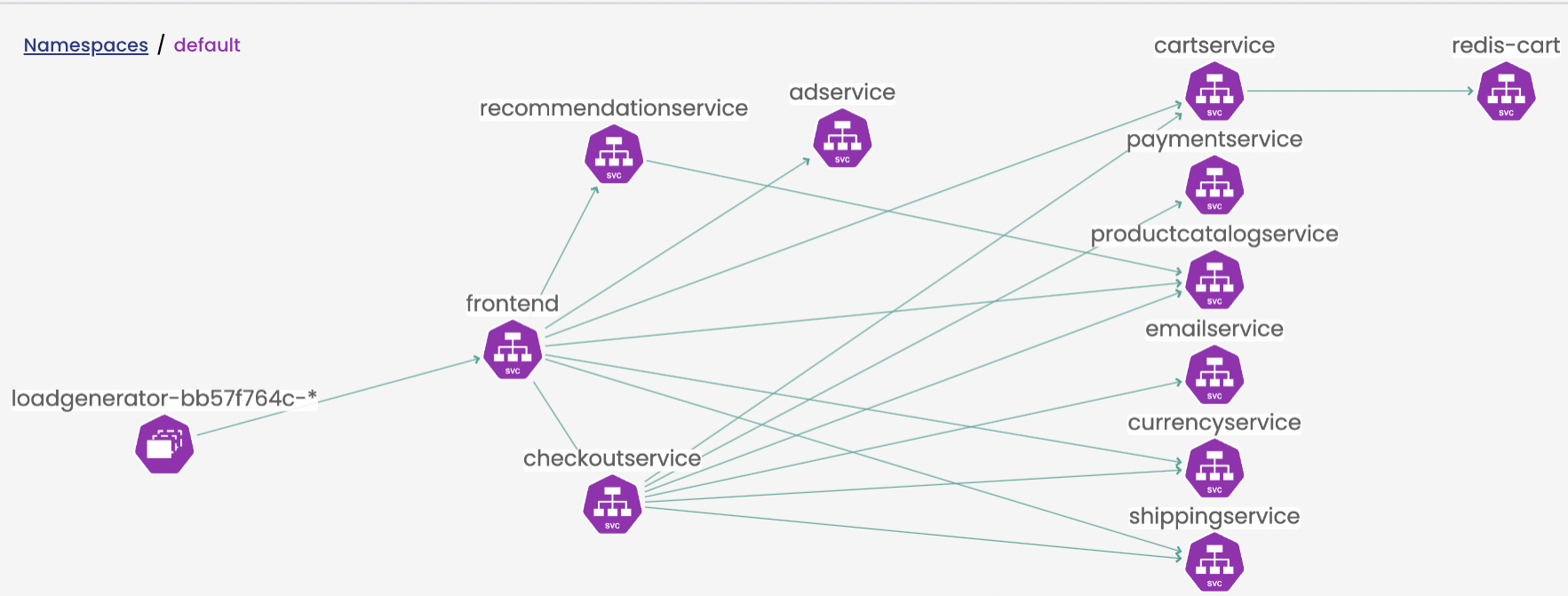
The service graph can then be viewed in the default namespace and looks like this:
Listing the services and service endpoints also tells us what we need to know in terms of the open ports for listening services:
kubectl get svcNAME TYPE CLUSTER-IP EXTERNAL-IP PORT(S) AGE
adservice ClusterIP 10.100.67.72 <none> 9555/TCP 10h
cartservice ClusterIP 10.100.8.142 <none> 7070/TCP 10h
checkoutservice ClusterIP 10.100.48.100 <none> 5050/TCP 10h
currencyservice ClusterIP 10.100.75.169 <none> 7000/TCP 10h
emailservice ClusterIP 10.100.166.251 <none> 5000/TCP 10h
frontend ClusterIP 10.100.58.18 <none> 80/TCP 10h
frontend-external LoadBalancer 10.100.133.64 ae8b616c7c0d14c6d8423a1f67c732b8-bf962617aa40d226.elb.ca-central-1.amazonaws.com 80:31601/TCP 10h
kubernetes ClusterIP 10.100.0.1 <none> 443/TCP 11h
paymentservice ClusterIP 10.100.76.182 <none> 50051/TCP 10h
productcatalogservice ClusterIP 10.100.36.212 <none> 3550/TCP 10h
recommendationservice ClusterIP 10.100.97.152 <none> 8080/TCP 10h
redis-cart ClusterIP 10.100.191.94 <none> 6379/TCP 10h
shippingservice ClusterIP 10.100.157.131 <none> 50051/TCP 10h
kubectl get endpoints
NAME                    ENDPOINTS
adservice               192.168.66.30:9555
cartservice             192.168.44.23:7070
checkoutservice         192.168.61.74:5050
currencyservice         192.168.55.224:7000
emailservice            192.168.68.65:8080
frontend                192.168.63.161:8080
frontend-external       192.168.63.161:8080
paymentservice          192.168.85.255:50051
productcatalogservice   192.168.45.107:3550
recommendationservice   192.168.89.134:8080
redis-cart              192.168.67.99:6379
shippingservice         192.168.35.86:50051
Testing the default allowed traffic
To verify that there is no restriction on traffic flows across the various microservices, we can create a netshoot pod in the same namespace to simulate an attacker pod and make some queries to the different services to prove that traffic is able to access all of the microservices without restriction. We are using netshoot here with the same label as the frontend pod for testing as the container provides many common debugging tools like curl and netcat out of the box in the container image, so that we can closely assume in a real scenario that the frontend pod running an old nginx image has been compromised by an attacker in the same namespace and tools installed to try and laterally move across the cluster.
Apply the following YAML:
apiVersion: v1
kind: Pod
metadata:
  name: netshoot
  labels:
    app: frontend
spec:
  containers:
  - name: netshoot
    image: nicolaka/netshoot:latest
    command: [ "/bin/bash", "-c", "--" ]
    args: [ "while true; do curl -m3 http://nginx-svc; sleep 300; done;" ]
    resources: {}
Test Queries:
In this scenario, let us assume that the target pod/svc redis-cart contains sensitive customer data in the database and is the target of the attacker.
First exec into the netshoot pod and query the redis-cart microservice with netcat on the relevant svc port
kubectl exec -t netshoot -- sh -c 'nc -zv redis-cart 6379'Result is as follows that proves that the query succeeded:
Connection to redis-cart (10.100.191.94) 6379 port [tcp/redis] succeeded!A netcat query to another critical svc paymentservice also shows that traffic is directly allowed:
kubectl exec -t netshoot -- sh -c 'timeout 3 nc -zv paymentservice 50051'Connection to paymentservice (10.100.76.182) 50051 port [tcp/*] succeeded!So in this scenario, theoretically once the attacker compromises or gains access to the frontend pod , they can directly reach the redis-cart or paymentservice and the entirety of all of the microservices in the namespace is available immediately for them to exploit and move laterally between all the pods in the namespace (and potentially other namespaces by extension).
Securing the Microservices
To reduce the attack surface of allowed traffic between the microservices, there are multiple approaches in terms of crafting the network policy. In this example, we will be using tiers along with network policy to explicitly allow only the traffic we want between the microservices.
The service graph diagram above helps us understand the traffic flows that need to be explicitly allowed. Calico policy can be written in native YAML along with pod label metadata to come up with a set of network policies that allow only the required traffic between the microservices.
Step 1: Setup Tiers
Tiers are a hierarchical construct used to group policies and enforce higher precedence policies that other teams cannot circumvent, providing the basis for Identity-aware microsegmentation.
All Calico and Kubernetes security policies reside in tiers. You can start “thinking in tiers” by grouping your teams and the types of policies within each group.
We create a tier called platform in this example to drop all of our microsegmentation policies in, and create another tier called security to drop in a global network policy that allows all DNS traffic in the cluster as this is necessary for service name resolution for the traffic.
Tier YAML:
apiVersion: projectcalico.org/v3
kind: Tier
metadata:
  name: security
spec:
  order: 300
---
apiVersion: projectcalico.org/v3
kind: Tier
metadata:
  name: platform
spec:
  order: 400
Step 2: Deploy Policies
Two mechanisms drive how traffic is processed across tiered policies:
- Labels and selectors
- Policy action rules
In addition to namespace scoped policies, Calico policies can also be applied to a global cluster-wide context. We make use of this to apply a policy cluster-wide that allows DNS resolution among the pods.
First we apply the global network policy to explicitly allow kube-DNS cluster-wide to all endpoints to the security tier with an Allow egress action targeted towards the destination of the kube-dns pods via the label selector and then a subsequent action to pass all the traffic to the next tier (platform)
apiVersion: projectcalico.org/v3
kind: GlobalNetworkPolicy
metadata:
  name: security.allow-kube-dns
spec:
  tier: security
  order: 200
  selector: all()
  types:
  - Egress
  egress:
    - action: Allow
      protocol: UDP
      source: {}
      destination:
        selector: k8s-app == "kube-dns"
        ports:
        - '53'
    - action: Pass
Next up, to the platform tier we add the traffic we want to allow for the microservices explicitly based on the service graph and the evaluation of all the services and endpoints in the namespaces to craft the full set of network policies scoped to the default namespace where we have the application deployed to come up with the topology in the service graph.
The advantage of policy tiering this way is that in this example the developers can be given access to the platform tier without access to the security tier which makes it so that no policy in the platform tier can block kube-DNS as that rule is already being allowed in the higher security tier preventing misconfiguration of policies in the platform tier even if DNS was not allowed explicitly in the network policies in the platform tier.
This looks as follows:
apiVersion: projectcalico.org/v3
kind: NetworkPolicy
metadata:
  name: platform.adservice
  namespace: default
spec:
  tier: platform
  order: 100
  selector: app == "adservice"
  ingress:
    - action: Allow
      protocol: TCP
      source:
        selector: app == "frontend"
      destination:
        ports:
          - '9555'
  egress:
    - action: Allow
      protocol: TCP
      source: {}
      destination:
        ports:
          - '80'
          - '443'
  types:
    - Ingress
    - Egress
---
apiVersion: projectcalico.org/v3
kind: NetworkPolicy
metadata:
  name: platform.cartservice
  namespace: default
spec:
  tier: platform
  order: 110
  selector: app == "cartservice"
  ingress:
    - action: Allow
      protocol: TCP
      source:
        selector: app == "checkoutservice"
      destination:
        ports:
          - '7070'
    - action: Allow
      protocol: TCP
      source:
        selector: app == "frontend"
      destination:
        ports:
          - '7070'
  egress:
    - action: Allow
      protocol: TCP
      source: {}
      destination:
        ports:
          - '6379'
    - action: Allow
      protocol: TCP
      source: {}
      destination:
        selector: app == "redis-cart"
        ports:
          - '6379'
  types:
    - Ingress
    - Egress
---
apiVersion: projectcalico.org/v3
kind: NetworkPolicy
metadata:
  name: platform.checkoutservice
  namespace: default
spec:
  tier: platform
  order: 120
  selector: app == "checkoutservice"
  ingress:
    - action: Allow
      protocol: TCP
      source:
        selector: app == "frontend"
      destination:
        ports:
          - '5050'
  egress:
    - action: Allow
      protocol: TCP
      source: {}
      destination:
        selector: app == "productcatalogservice"
        ports:
          - '3550'
    - action: Allow
      protocol: TCP
      source: {}
      destination:
        selector: app == "shippingservice"
        ports:
          - '50051'
    - action: Allow
      protocol: TCP
      source: {}
      destination:
        ports:
          - '80'
    - action: Allow
      protocol: TCP
      source: {}
      destination:
        selector: app == "cartservice"
        ports:
          - '7070'
    - action: Allow
      protocol: TCP
      source: {}
      destination:
        selector: app == "currencyservice"
        ports:
          - '7000'
    - action: Allow
      protocol: TCP
      source: {}
      destination:
        selector: app == "emailservice"
        ports:
          - '8080'
    - action: Allow
      protocol: TCP
      source: {}
      destination:
        selector: app == "paymentservice"
        ports:
          - '50051'
  types:
    - Ingress
    - Egress
---
apiVersion: projectcalico.org/v3
kind: NetworkPolicy
metadata:
  name: platform.currencyservice
  namespace: default
spec:
  tier: platform
  order: 130
  selector: app == "currencyservice"
  ingress:
    - action: Allow
      protocol: TCP
      source:
        selector: app == "checkoutservice"
      destination:
        ports:
          - '7000'
    - action: Allow
      protocol: TCP
      source:
        selector: app == "frontend"
      destination:
        ports:
          - '7000'
  types:
    - Ingress
---
apiVersion: projectcalico.org/v3
kind: NetworkPolicy
metadata:
  name: platform.emailservice
  namespace: default
spec:
  tier: platform
  order: 140
  selector: app == "emailservice"
  ingress:
    - action: Allow
      protocol: TCP
      source:
        selector: app == "checkoutservice"
      destination:
        ports:
          - '8080'
  types:
    - Ingress
---
apiVersion: projectcalico.org/v3
kind: NetworkPolicy
metadata:
  name: platform.frontend
  namespace: default
spec:
  tier: platform
  order: 150
  selector: app == "frontend"
  ingress:
    - action: Allow
      protocol: TCP
      source:
        selector: app == "loadgenerator"
      destination:
        ports:
          - '8080'
    - action: Allow
      protocol: TCP
      source: {}
      destination:
        ports:
          - '8080'
  egress:
    - action: Allow
      protocol: TCP
      source: {}
      destination:
        selector: app == "checkoutservice"
        ports:
          - '5050'
    - action: Allow
      protocol: TCP
      source: {}
      destination:
        selector: app == "currencyservice"
        ports:
          - '7000'
    - action: Allow
      protocol: TCP
      source: {}
      destination:
        selector: app == "productcatalogservice"
        ports:
          - '3550'
    - action: Allow
      protocol: TCP
      source: {}
      destination:
        selector: app == "recommendationservice"
        ports:
          - '8080'
    - action: Allow
      protocol: TCP
      source: {}
      destination:
        selector: app == "shippingservice"
        ports:
          - '50051'
    - action: Allow
      protocol: TCP
      source: {}
      destination:
        ports:
          - '8080'
          - '5050'
          - '9555'
          - '7070'
          - '7000'
    - action: Allow
      protocol: TCP
      source: {}
      destination:
        selector: app == "adservice"
        ports:
          - '9555'
    - action: Allow
      protocol: TCP
      source: {}
      destination:
        selector: app == "cartservice"
        ports:
          - '7070'
  types:
    - Ingress
    - Egress
---
apiVersion: projectcalico.org/v3
kind: NetworkPolicy
metadata:
  name: platform.loadgenerator
  namespace: default
spec:
  tier: platform
  order: 160
  selector: app == "loadgenerator"
  egress:
    - action: Allow
      protocol: TCP
      source: {}
      destination:
        selector: projectcalico.org/namespace == "default"
        ports:
          - '80'
    - action: Allow
      protocol: TCP
      source: {}
      destination:
        selector: app == "frontend"
        ports:
          - '8080'
  types:
    - Egress
---
apiVersion: projectcalico.org/v3
kind: NetworkPolicy
metadata:
  name: platform.paymentservice
  namespace: default
spec:
  tier: platform
  order: 170
  selector: app == "paymentservice"
  ingress:
    - action: Allow
      protocol: TCP
      source:
        selector: app == "checkoutservice"
      destination:
        ports:
          - '50051'
  types:
    - Ingress
---
apiVersion: projectcalico.org/v3
kind: NetworkPolicy
metadata:
  name: platform.productcatalogservice
  namespace: default
spec:
  tier: platform
  order: 180
  selector: app == "productcatalogservice"
  ingress:
    - action: Allow
      protocol: TCP
      source:
        selector: app == "checkoutservice"
      destination:
        ports:
          - '3550'
    - action: Allow
      protocol: TCP
      source:
        selector: app == "frontend"
      destination:
        ports:
          - '3550'
    - action: Allow
      protocol: TCP
      source:
        selector: app == "recommendationservice"
      destination:
        ports:
          - '3550'
  egress:
    - action: Allow
      protocol: TCP
      source: {}
      destination:
        ports:
          - '80'
  types:
    - Ingress
    - Egress
---
apiVersion: projectcalico.org/v3
kind: NetworkPolicy
metadata:
  name: platform.recommendationservice
  namespace: default
spec:
  tier: platform
  order: 190
  selector: app == "recommendationservice"
  ingress:
    - action: Allow
      protocol: TCP
      source:
        selector: app == "frontend"
      destination:
        ports:
          - '8080'
  egress:
    - action: Allow
      protocol: TCP
      source: {}
      destination:
        ports:
          - '80'
    - action: Allow
      protocol: TCP
      source: {}
      destination:
        selector: app == "productcatalogservice"
        ports:
          - '3550'
  types:
    - Ingress
    - Egress
---
apiVersion: projectcalico.org/v3
kind: NetworkPolicy
metadata:
  name: platform.redis-cart
  namespace: default
spec:
  tier: platform
  order: 200
  selector: app == "redis-cart"
  ingress:
    - action: Allow
      protocol: TCP
      source:
        selector: app == "cartservice"
      destination:
        ports:
          - '6379'
  types:
    - Ingress
---
apiVersion: projectcalico.org/v3
kind: NetworkPolicy
metadata:
  name: platform.shippingservice
  namespace: default
spec:
  tier: platform
  order: 210
  selector: app == "shippingservice"
  ingress:
    - action: Allow
      protocol: TCP
      source:
        selector: app == "checkoutservice"
      destination:
        ports:
          - '50051'
    - action: Allow
      protocol: TCP
      source:
        selector: app == "frontend"
      destination:
        ports:
          - '50051'
  egress:
    - action: Allow
      protocol: TCP
      source: {}
      destination:
        ports:
          - '80'
  types:
    - Ingress
    - Egress
Re-testing Traffic Flows
Run the tests again to have the netshoot pod try and access the redis-cart and paymentservice services
kubectl exec -t netshoot -- sh -c 'timeout 3 nc -zv redis-cart 6379'kubectl exec -t netshoot -- sh -c 'timeout 3 nc -zv paymentservice 50051'We now see the commands timeout after the 3 seconds
command terminated with exit code 143Conclusion
By utilizing Calico network policy with tiering we were able to reduce the attack surface of deployed microservices in a namespace and implemented microsegmentation to prevent lateral movement of threats across different services within a namespace.
Ready to try Calico for yourself? Get started with a free Calico Cloud trial.


Join our mailing list
Get updates on blog posts, workshops, certification programs, new releases, and more!