










Kubernetes, by default, adopts a permissive networking model where all pods can freely communicate unless explicitly restricted using network policies. While this simplifies application deployment, it introduces significant security risks. Unrestricted network traffic allows workloads to interact with unauthorized destinations, increasing the potential for cyberattacks such as Remote Code Execution (RCE), DNS spoofing, and privilege escalation.
To better understand these problems, let’s examine a sample Kubernetes application: ANP Demo App.
This application comprises a deployment that spawns pods and a service that exposes them to external users in a similar situation like any real word workload which you will encounter in your environment.
If you open the application service before implementing any policies, the application reports the following messages:
- Container can reach the Internet – Without network policies, an attacker can use our container as an entry point by exploiting it with a vulnerability. This could allow them to exfiltrate data or establish remote control over the workload by leveraging its Internet access.
- Container can reach CoreDNS Pods – Kubernetes relies heavily on DNS, with records served using CoreDNS Pods. While communication between your Pods and CoreDNS is essential and not inherently a vulnerability, pairing it with unrestricted access to external DNS servers creates a significant security risk such as cluster wide DNS poisoning from a vulnerable pod or a pod with access to NET_RAW capabilities.
- Container can reach external DNS servers – Without restricting network policies, attackers can leverage techniques such as DNS poisoning, where they manipulate DNS responses to redirect traffic to malicious destinations.
- Container can reach the Kubernetes API Server – Often overlooked but without network policies all workloads can access the host via local networking addresses, or host sockets. While some applications require these communications, unrestricted access can serve as an escalation entry point for attackers to exploit internal services which are not managed by Kubernetes (e.g., Host SSH Daemon, DNS, Bluetooth, etc.).
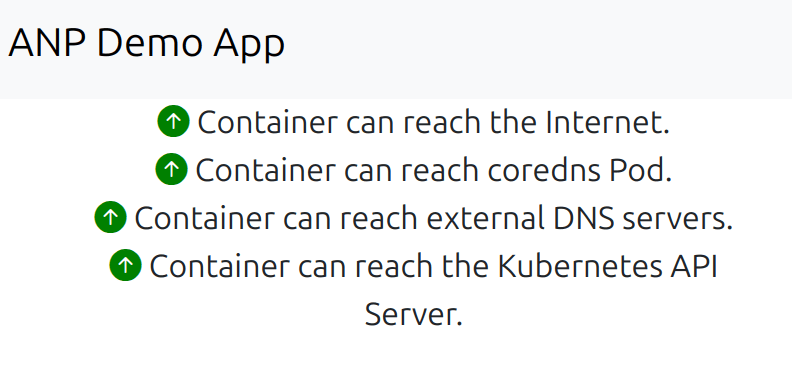
In this blog post we are going through a scenario to secure our cluster by preventing our workloads from accessing the external resources. Number 1 and 3 from the previous list.
The Need for a Zero Trust Model
In Kubernetes, the default permissive networking model, where all pods can freely communicate, poses a significant security challenge. While network policies are crucial for enforcing a Zero Trust security model, identifying the necessary network flows for an application to function correctly can be difficult.
Using CLI tools to inspect network traffic and deduce the required policies can be a complex and time-consuming task. It often involves sifting through large amounts of data and requires a deep understanding of network protocols and Kubernetes internals. Even for experienced administrators, accurately capturing all necessary flows without disrupting application functionality is a challenge.
Simplifying Network Flow Visibility with Calico Whisker
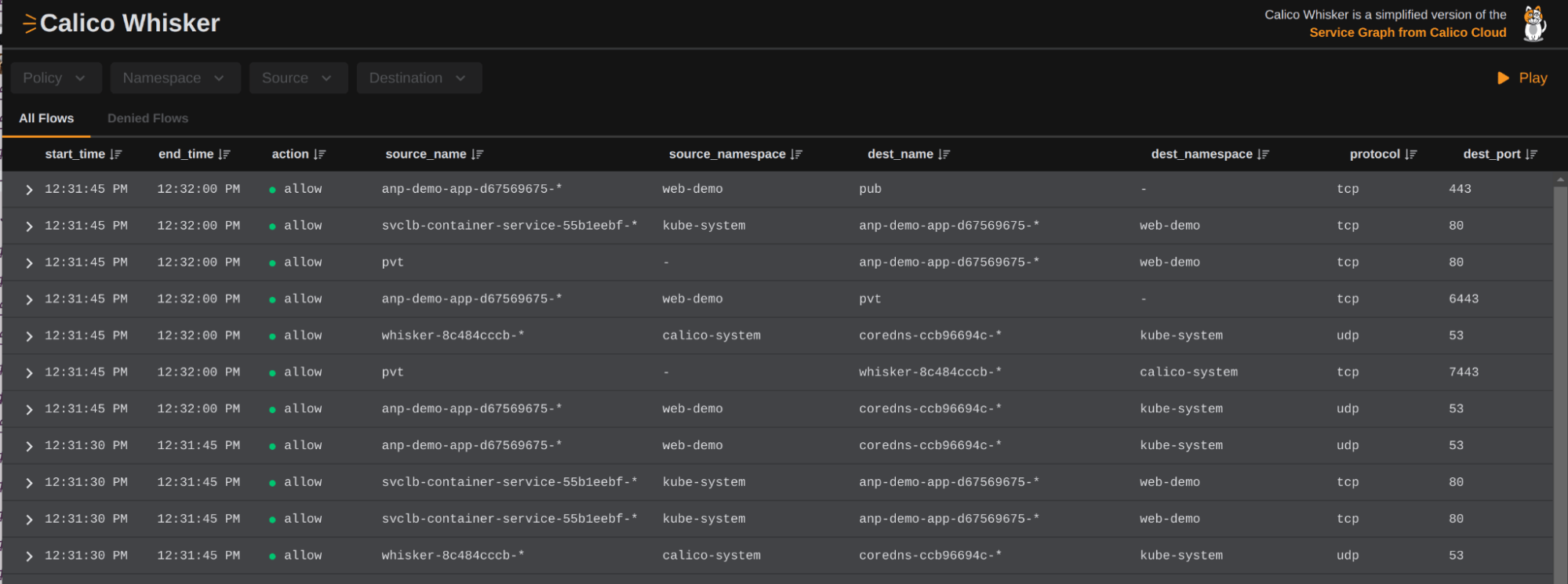
To address the complexities of network flows, and network policy management, Calico now provides an intuitive UI called Whisker, a simple but powerful UI that significantly simplifies the process of visualizing network flows and understanding how policies interact.
Calico Whisker provides a clear and concise view of network traffic within the Kubernetes environment, making it easier to identify communication patterns and dependencies. By presenting network flows in a user-friendly format, Whisker enables administrators to quickly grasp which connections are essential and which pose potential security risks. This enhanced visibility streamlines the creation of precise network policies, ensuring robust security without hindering application performance.
Note: Calico Cloud policy recommendation can be freely used to automatically create policies based on your cluster networking flows.
The following image illustrates the Calico Whisker dashboard:
Using Calico Whisker to Secure the ANP Demo APP
With Calico Whisker, we can gain visibility into all workload traffic and use this insight to define strict security policies. Here’s how we do it:
- Deploy Calico Whisker in your environment – This provides an intuitive UI to monitor network behavior.
- Analyze existing network flows – Using Whisker, we observe that our web-demo application is making unnecessary external connections.
The following images illustrate our demo application reaching out to the public addresses over the internet, a security risk that we examined in the introduction:
- Craft precise network policies – Based on Whisker’s data, we define policies that block unwanted traffic while allowing only the essential connections.
The following image illustrates some of the details that you get from the Whisker UI, about each flow:
- Implement a deny-by-default stance – Now that we have visibility into our networking needs we can easily enforce security by allowing only explicitly permitted flows, preventing unauthorized access.


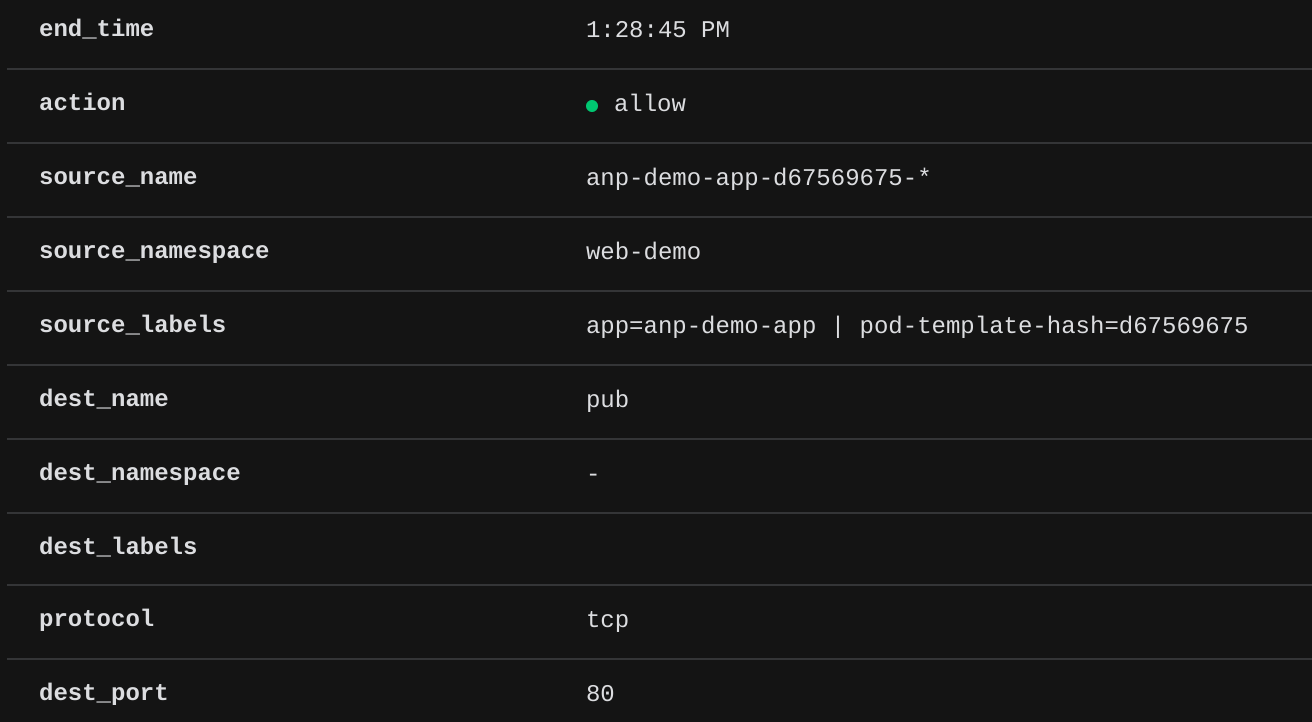
For example, inspecting Whisker’s UI, we observe our application accessing external services over TCP port 80. The following network flow data is logged:
"start_time":"2025-03-07T20:36:00Z","end_time":"2025-03-07T20:36:15Z",
"action":"allow","source_name":"anp-demo-app-d67569675-*",
"source_namespace":"web-demo","source_labels":"app=anp-demo-app | pod-template-hash=d67569675",
"dest_name":"pub","dest_namespace":"-","dest_labels":"",
"protocol":"tcp","dest_port":80,"reporter":"src",
"packets_in":30,"packets_out":31,"bytes_in":42797,"bytes_out":30
From this data, we can write a Calico Global Network Policy that blocks external internet access throughout our clusters for any workloads while only allowing them to communicate with the CoreDNS pod.
apiVersion: projectcalico.org/v3
kind: GlobalNetworkPolicy
metadata:
  name: deny-app-policy
spec:
  tier: adminnetworkpolicy
  namespaceSelector: kubernetes.io/metadata.name not in {"calico-system", "kube-public", "kube-system", "tigera-operator"}
  types:
  - Ingress
  - Egress
  egress:
   # allow all namespaces to communicate to DNS pods
  - action: Allow
    protocol: UDP
    destination:
      selector: 'k8s-app == "kube-dns"'
      ports:
      - 53
  - action: Allow
    protocol: TCP
    destination:
      selector: 'k8s-app == "kube-dns"'
      ports:
      - 53
At this point if you try to refresh the ANP Demo App you will see the following messages:
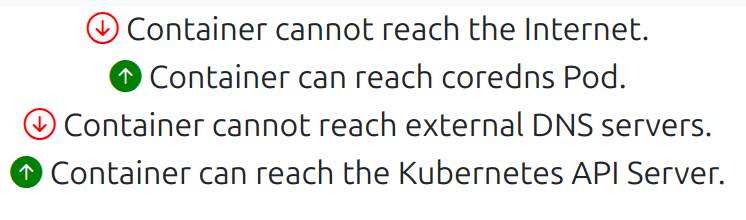
And the following dropped rows in Whisker:


Perfect, we have implemented security with one policy for all of our workloads in this cluster.
What if you missed something?
If you look closely at the Whisker UI after implementing the Default Deny policy, you will see that there are some deny actions related to the load balancer. This is a common mistake that people make when designing policies, they usually overlook a certain connection or don’t properly identify all related connections that are tied to it and Whisker is highlighting it for us.

To better understand this issue, we need to talk about TCP.
A TCP connection has something called keep-alive, which keeps the initial connection open for a certain period of time. Since we previously accessed our demo app, we have an open connection to the server and we can still connect to the page. However, new connections are getting dropped, meaning that after our existing connection expires, we also will be unable to open the demo page.
By clicking on the denied application flow we can figure out the parts that are required to be implemented in our policy. To fix this issue, we need to create an ingress policy to allow web traffic into our demo app.
apiVersion: projectcalico.org/v3
kind: NetworkPolicy
metadata:
  name: web-demo-ingress
  namespace: web-demo
spec:
  selector: app == "anp-demo-app"
  ingress:
  - action: Allow
    protocol: TCP
    destination:
      selector: app == "anp-demo-app"
      ports:
      - 80
After implementing this policy you should shortly see the following flows indicating that we have fixed the problem.

Try Calico Whisker in your browser!
Note: In this blog post we only covered securing workload traffic, Calico also provides the ability to secure your host or non-namespaced resources in your cluster such as host sockets, and network cards using a unique Calico feature called hostendpoint. If you are interested, please take a look at our documentation here.
Conclusion
Kubernetes security is a critical concern, and Calico Whisker offers a free, open-source, and intuitive way to analyze cloud networking and enforce secure network policies. By implementing Zero Trust principles, we can ensure that workloads operate within a tightly controlled network, minimizing exposure to cyber threats.
If you’re running Kubernetes in production, now is the time to integrate Calico Whisker and take control of your cluster’s security.
Ready to try Whisker? Try our interactive Observability workshop.