










Kubernetes has transformed how we deploy and manage applications. It gives us the ability to spin up a virtual data center in minutes, scaling infrastructure with ease. But with great power comes great complexities, and in the case of Kubernetes, that complexity is security.
By default, Kubernetes permits all traffic between workloads in a cluster. This “allow by default” stance is convenient during development, and testing but it’s dangerous in production. It’s up to DevOps, DevSecOps, and cloud platform teams to lock things down.
To improve the security posture of a Kubernetes cluster, we can use microsegmentation, a practice that limits each workload’s network reach so it can only talk to the specific resources it needs. This is an essential security method in today’s cloud-native environments.
Why Is Microsegmentation So Hard?
We all understand that network policies can achieve microsegmentation; or in other words, it can divide our Kubernetes network model into isolated pieces. This is important since Kubernetes is usually used to provide multiple teams with their infrastructural needs or host multiple workloads for different tenants. With that, you would think network policies are first citizens of clusters. However, when we dig into implementing them, three operational challenges make most practitioners reluctant about implementing policies.
- Cluster Posture: Which applications are running and what are their communication requirements?
- Policy Design and Ownership: Who owns which policies, and how are they safely scoped?
- Testing and Troubleshooting: How do we verify that a policy works as intended without breaking the cluster?
While Kubernetes supports network policies, it cannot enforce them. In fact, it uses an abstraction layer to outsource this responsibility to your CNI of choice and, depending on your CNI or policy engine, the ease in which you can implement microsegmentation can vary.
🛡️Securing the Default Cluster Posture with Kubernetes Network Policy
The Kubernetes networking.k8s.io/v1 API group assigns each namespace with a default policy “container” (a “container” is similar to a folder it holds one or more policies) and each policy that you create will permit traffic within that namespace and everything else that is selected by the policy but doesn’t enforce a verdict will be dropped by the implicit deny at the end. In such an architecture since all policies are assigned to a default container each user can modify the system behaviour (or policies that the security team puts in place) and put the whole cluster at risk. On top of that, since network policies can only be assigned to existing namespaces, each new namespace that users create will have no policies and will follow the default Kubernetes networking behaviour, which is everything permitted until a policy is added.
The following illustration describes how Kubernetes Network Policies are managed in the cluster:
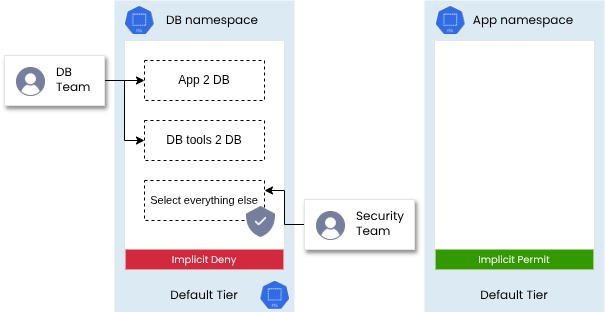
This all-or-nothing approach is difficult to manage and can lead to confusion. Imagine writing a policy in a namespace and unintentionally blocking traffic for other workloads within that namespace, yikes!
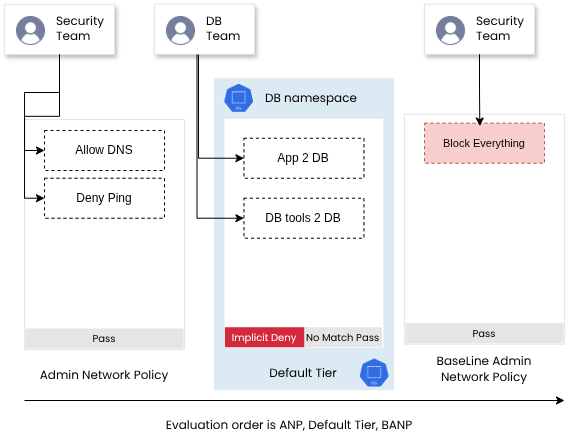
Calico Open Source v3.30 implements a more elegant solution: Admin Network Policy and Baseline Admin Network Policy standards. These two new resources are part of a Kubernetes community movement to create better policy resources that can address modern architecture and agile environments. Admin and Baseline admin network policies come before and after the default tier and can be used to set the overall security posture of a cluster while allowing other tenants and teams to create exceptions within that framework.
The following illustration shows how admin network policy and baseline admin network policies are used to allow more control over cluster security posture:
🔐 What Makes Admin Network Policy (ANP) So Special?
- Not namespaced: These policies apply cluster-wide.
- Priority field: Set policy evaluation order.
- Explicit actions: Allow, deny, pass, and no more ambiguity.
- Gralunar control: ANP policies can target nodes, networks, or multiple namespaces.
This lets platform and security engineers define a global security posture that governs the entire cluster. Admin policies sit above workload-specific ones, ensuring a top-down approach to cluster segmentation.
🛡️Reach Even Further with Calico Network Policies
In addition to complete support for Kubernetes Network Policy resources, Calico also implements two unique network policy resources that provide additional security features that are not part of the Kubernetes network policy standard.
A few of these key points are:
- Calico Global Network Policy and Calico Network Policy: Calico network policy offers a richer set of capabilities compared to Kubernetes network policy. It provides features such as policy/tier ordering/priority, log rules, and more flexible match rules.
- Calico unlimited tiers: Calico’s policy enforcement model allows for the organization of policies into tiers, enabling complex and hierarchical policy structures.
- More granular filters to select exactly what you want with your policies: Calico’s network policies can be applied to various types of endpoints, including pods, virtual machines (VMs), and host interfaces, allowing for more precise control over network traffic.
- Hostendpoints and the ability to secure non-namespaced traffic. (containerd, Server network cards, etc…): Calico network policy can be applied to host endpoints to secure traffic originating from or destined for hosts, including non-namespaced traffic.
If you’d like to learn more about these additional features, click here.
🧩 Delegating Policy Ownership with Kubernetes RBAC
Once you’ve established cluster-wide controls, you need to make sure only the right people can modify them. This can be implemented using Kubernetes RBAC.
Associate tenants or teams with specific namespaces:
- Generate unique service accounts or users for each namespace.
- Prevent tampering with global or baseline policies.
This creates a clean separation of concerns allowing platform security teams to manage cluster-wide postures with admin and baseline admin network policies and application teams manage workload-specific policies within their namespace.
If you’d like to learn more about Calico RBAC integration, check out this tutorial.
🧪 Safely Testing and Troubleshooting Policies
Network policies are powerful but also potentially disruptive. A simple misconfiguration could block communication between services, degrade availability, or even take down your app entirely.
Calico v3.30 makes this safer than ever with three major innovations. Let’s take a look.
👀 Calico Whisker: Observe Before You Act
Writing effective policies requires a degree of knowledge and insight about the network and workload behaviour. Previously, Calico users relied on policy logs to generate these insights but now with Whisker, observability is built-in.
Whisker is a simple yet powerful UI dashboard that lets you:
- Monitor all workload traffic flows in your cluster.
- Filter flows by namespace, labels, protocols, etc.
- Visualize the policy priority and enforcement within your workloads.
- Export flow details to help construct policies.
With Whisker, you don’t need to guess what policies should contain, you just write what you see and it works like a charm!
🎥 Watch a demo of Whisker in action
🧪 Staged Network Policies: Test Without Breaking Things
Let’s say you had a busy day and drafted a lot of new policies to secure your awesome workloads. What if you made a mistake in copy-pasting values? Or there was a mixup between ports and now your policies might block something critical?
Instead of deploying it live, you can now create a Staged Network Policy, a unique Calico resource that simulates the effect of a policy without enforcing it.
- It shows how many packets or flows would be affected.
- Staged network policy as an audit not an enforcement, in other words it tells you what is going to happen if you enforce such a policy without creating any disruption in your network.
- You get to test your policy before flipping the enforcement switch.
This is especially helpful when rolling out policies across complex, multi cluster or multi-team environments.
🤖 Policy Recommendation Engine (Free with Calico Cloud Free Tier)
As fun as policy creation sounds it can be a bit hectic to generate policies for a huge environment. Want help generating policies based on actual traffic?
By connecting your cluster to Calico Cloud, you get access to a Policy Recommendation Engine that analyzes live traffic and automatically-generates staged policies based on actual traffic flows. Policy recommendation is available for free and suggested policies are created in the form of staged network policies.
This removes the guesswork and accelerates the path to secure segmentation.
🗺️ Bonus: Visual Tools in Calico Cloud Free Tier
Calico Cloud Free Tier doesn’t end with a policy recommendation engine, you’ll also get access to:
- Service Graph: An interactive visual map of how services and endpoints communicate.
- Policy Board: A UI to manage, view, and navigate existing network policies.
These tools provide the context and control you need to secure Kubernetes environments at scale.
Try our free demos to learn about Service Graph or Policy Board.
Conclusion: Microsegmentation Doesn’t Have to Be a Nightmare
Kubernetes may be insecure by default, but Calico v3.30 gives you everything you need to secure it, by:
- Defining a secure cluster posture using Admin Network Policies
- Delegating ownership through namespace isolation and RBAC,
- Enabling safe testing and observability with Whisker, Staged Policies, and Calico Cloud Free Tier
You can implement microsegmentation without breaking your cluster, apps, or your brain. You can even take it further by connecting your cluster to our Calico Cloud Free Tier and accessing a lot of enterprise grade bells and whistles that make your Kubernetes life easier.
Whether you’re a platform engineer, security architect, or DevOps pro, Calico v3.30 gives you the power to build a zero-trust network architecture inside Kubernetes with ease.
👉 Next Steps: